 Бичлэг


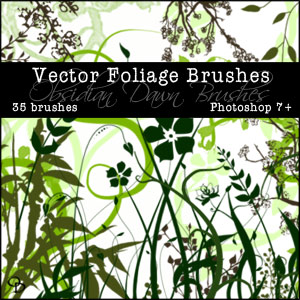 Энэ brush-ыг таньд
it is nice . ! . ! .
Татах холбоос : Obsidiandawn
Энэ brush-ыг таньд
it is nice . ! . ! .
Татах холбоос : Obsidiandawn
 UrbanFonts.com provides a ready source to download fonts for free as well as commercial fonts for both Macs and Windows. And the special touches, like articles, a font blog and a message board, mean users don't have to just stop by and stock up on fonts. Rather, users can learn about fonts and participate in an online community dedicated to the art and craft of typography.
 DaFont.com offers free downloadable pixel fonts and TrueType fonts for Mac and Windows. Read our interview with site owner Rodolphe Milan.Pixel Font Silkscreen — Silkscreen is a four member type family for your Web graphics created by Jason Kottke. Silkscreen, with both Mac and Windows versions, is free for personal and corporate use.Tim Burton Fonts — You'll find a collection of free fonts from Tim Burton movies, including Mars Attacks!, Nightmare Before Christmas, Sleepy Hollow, and Willy Wonka.
 The owners of Morgue File have a philosophy of free exchange of photos and ideas, which very much sets the tone for the site. In keeping with this vibe, the site offers a community section where you can participate in bulletin board discussions or join as a member if you wish to contribute your own work. They also provide free online photography courses and sponsor a scavenger hunt and photo competition. Their stock photos can be used in commercial or personal projects without permission or credit from the photographer, and as mentioned, you can also submit photos to the site with their approval. You'll find a very broad range of subjects offered, and the site is neatly organized and user-friendly.
 morgueFile
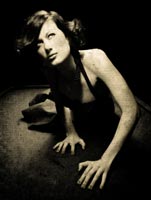 Now at version 6, Photo/Graphic Edges includes new features and effects, including SmartLayers, Visual Layer Presets, Brush Effects, Unlimited Undo and new creative content. You can install Photo/Graphic Edges as a Photoshop plug-in for versions 4 through CS, or as a stand-alone application. The package costs $179 and comes with the following on 3 CDs:
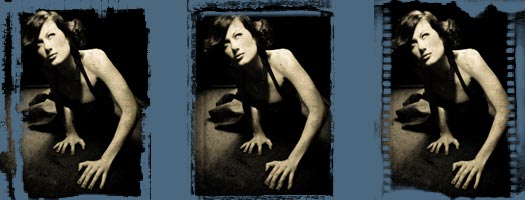
To show the various effects of Photo/Graphic Edges I've used just one single image. This will make it easier to see just how much the mood and feeling of a photo can be changed by incorporating different edges and frames.
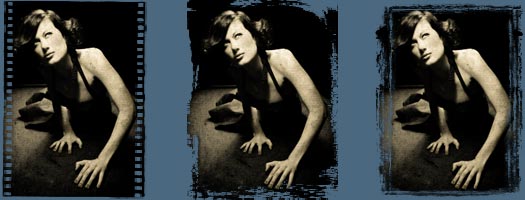
History Palette & Pre-sets
Photo/Graphic Edges lets you save configurations as pre-sets so that you can apply them to other photos. There's also a History Palette that shows you what you've recently called up. So if down the line I feel I should have stayed with the "mysterious" film strip after all, I can easily go back and select it using the History Palette.
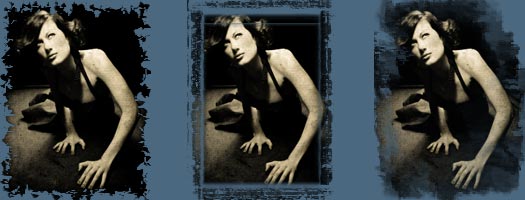
Intuitive User Interface
Photo/Graphic Edges features a common user interface design so that learning how to use one effect helps you understand how to use the others. The program is built around SmartLayers technology. Everything is dynamic so when you click on a layer all the controls for that layer and effect are automatically loaded up for you to adjust. The layers palette lets you turn on, off, clone, move and add new layers.
Non-destructive Imaging Architecture
PGE 6 uses a non-destructive dynamic imaging architecture, so you can undo, redo and adjust repeatedly and your original image is never changed until you save the file. You can combine effects together, transform and resize images over and over, and the quality never degrades. Photo/Graphic Edges also includes borders, bevels, and photo-realistic picture frames.
Online Help System
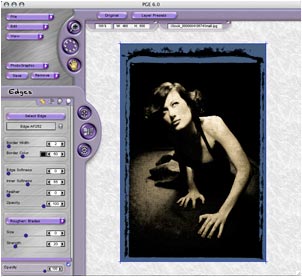 Hold your mouse over a control for a few seconds and a floating window appears that contains detailed instructions about the control.
Brush-On Effects
Brush-On Effects allow you to interact with the effects to get exactly the look you are after.
Preview System
An adjustable preview feature has a 1600% marquee zoom capability with built-in panning support.
SmartLayers
SmartLayers enable you to combine different effects together in the same composition. New layer functionality also includes masking layers, photo layers for placing new photos onto layers in PGE 6, color correction layers for adjusting image colors and advanced layer functionality such as cloning, renaming, moving, deleting and adjusting opacity levels for each layer.
Save And Replay Your Settings
Save and Load your effect settings for instant replay. Presets are Resolution Independent. Save them while working on a large file and they apply the same to a smaller file or an even larger file and get the same results.
Memory Dots
Click a memory dot on the interface and PGE 6 remembers your current settings. You can explore with your design ideas and come back to where you were with a single click.
14 Artistic Effects For Photos
Here's a list of the Artistic Effects that are part of the package:
 Photo Border - Add interesting borders around your image using border shapes and 3D depth tools.
 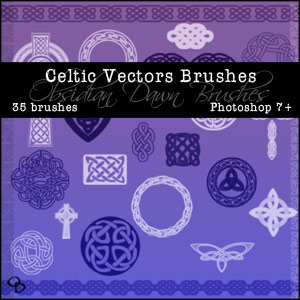 I’ve been meaning to do a set like this for-ev-er. I LOVE celtic designs, and have a ton of celtic jewelry, but for some reason kept putting off making this set. Well, no longer! In fact, I’ve still got enough ideas for a second set relatively soon, if this one goes over well.
This Photoshop brush set is made up of 35 celtic knotwork designs. Some circular, some square, some solid, some outlines... and a few celtic crosses in there, as well.
Go now and download Celtic Vectors Photoshop Brushes.
Random Brushes Tip:
The transform selection tool is your friend. Ever had trouble getting your selection JUST right, and had to start back over again from scratch? Well, you don’t have to!
To see what I mean, try to perfectly select around a box in an image. Unless you’re really careful, you may not get it just right the first time. So choose Select > Transform Selection from the menu, and you can now expand or contract that selection to your heart’s content. You can even zoom in so that you can get it JUST right before choosing Select > Transform Selection and do it that way.
And that doesn’t just apply to boxes. You can go from a free transform (which is how it starts out) into any other kind of transform that you want by choosing Edit > Transform > *****. That even includes distort and warp!
It’s hard to explain the all of the kinds of situations where this may be useful, but I’ve found it very useful numerous times. So keep it in mind for that day that you too may need it!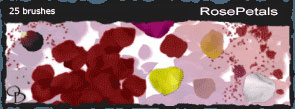 Stephanie from Obsidian Dawn sends this in: "Hey there! Just a quick note to let you all know that I have a new brush set out. It's rose petals, and you can find it here: Obsidian Dawn. Thanks :)"
 Random Textures - 16 brushes Random Textures II - 29 brushes Animal Prints - 17 brushes Animal Tracks - 32 brushes Artistic - 18 brushes Baby - 26 brushes Blood Spots - 26 brushes Bullets (Web) - 31 brushes Clouds - 22 brushes Cobwebs - 30 brushes Confusion - 35 brushes Dark -N- Gothic - 29 brushes Dingbats - Shapes - 31 brushes Embellishments - 42 brushes Eyes - 20 brushes Fancy Fabrics - 16 brushes Feathers - 34 brushes Fences - 28 brushes Ferns - 29 brushes Flames - 16 brushes Gems & Stones - 31 brushes Glass Bottles - 32 brushes Glitter & Sparkles - 28 brushes Grasses & Plants - 25 brushes Gravel & Sand Textures - 15 brushes Grunge Scratches - 14 brushes Hair - 22 brushes Handwriting - 47 brushes Hearts - 24 brushes Hieroglyphs - Symbols - 26 brushes Hieroglyphs - Letters - 27 brushes Holiday - 39 brushes Random Textures - 16 brushes Random Textures II - 29 brushes Animal Prints - 17 brushes Animal Tracks - 32 brushes Artistic - 18 brushes Baby - 26 brushes Blood Spots - 26 brushes Bullets (Web) - 31 brushes Clouds - 22 brushes Cobwebs - 30 brushes Confusion - 35 brushes Dark -N- Gothic - 29 brushes Dingbats - Shapes - 31 brushes Embellishments - 42 brushes Eyes - 20 brushes Fancy Fabrics - 16 brushes Feathers - 34 brushes Fences - 28 brushes Ferns - 29 brushes Flames - 16 brushes Gems & Stones - 31 brushes Glass Bottles - 32 brushes Glitter & Sparkles - 28 brushes Grasses & Plants - 25 brushes Gravel & Sand Textures - 15 brushes Grunge Scratches - 14 brushes Hair - 22 brushes Handwriting - 47 brushes Hearts - 24 brushes Hieroglyphs - Symbols - 26 brushes Hieroglyphs - Letters - 27 brushes Holiday - 39 brushes |
Ink Blot Test - 26 brushes Jigsaw Puzzle Pieces - 22 brushes Kanji - 40 brushes Labels - 38 brushes Lace - 28 brushes Leaves - 28 brushes Lightning - 24 brushes Lips - 23 brushes Micro Patterns - 31 brushes Music - 32 brushes Nature Textures - 15 brushes Nordic Runes - 24 brushes Office Stuff - 48 brushes Paisley - 37 brushes Plain Fabrics - 23 brushes Planets - 28 brushes Playing Cards - 54 brushes Pressed Garden Flowers - 31 brushes Pressed Wildflowers - 33 brushes Scribbles & Doodles - 37 brushes Shattered Glass - 17 brushes Space - 16 brushes Speckles & Spatters - 22 brushes Sports - 49 brushes Stitching (Sewing) - 33 brushes Swirls & Flourishes - 37 brushes Tiles, Tiles, & More Tiles - 32 brushes Tribal (Large) - 16 brushes Tribal (Small) - 23 brushes Water - 36 brushes Waterstains - 24 brushes Wings - 38 brushes |

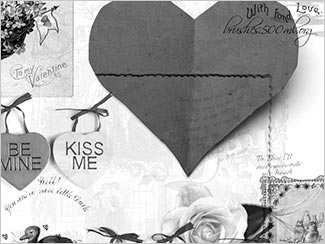 The inspired and inspiring Kirsty of 500ml Brushes has done it again - creating another exclusive brush set for us. This time our brush Diva has come up with a magnificent collection of love symbols and romantic gestures. Download the My Vintage Valentine Brush Set (zip/1.8MB).BONUS- Valentine Hearts & Valentine Photoshop Brush Gifts From Stephanie!


